# The SENDUNE Times

A collection of articles under the pompous name of '<mark style="color:red;">**The SENDUNE Times**</mark>'.

Articles here are less about software (you can get those in so many other places) and more about art, design, philosophy, and, humour. Written by team members from [<mark style="color:red;">**sendune.com**</mark>](https://sendune.com) and occasionally by others.&#x20;

If you have something '*really insightful'* to share, please reach out to <hello@sendune.com> and we'll publish it here. Please read [<mark style="color:red;">this</mark>](/the-internet-is-an-seo-landfill) before submitting any article.

**Cheers.** \
**SENDUNE Team.** \
**(formerly Send With SES).**

[<br>](https://blog.sendune.com/philosophy-101-for-founders)


# Why switch to SENDUNE?

If you are a Startup, chances are your entire tech stack is on AWS but you are not using [AWS SES](https://aws.amazon.com/ses/). Instead you use a third party email service like Mailchimp or SendGrid.

AWS SES has the same reliability and deliverability as any other email service. And it comes at a price point too good to ignore. So why does SES not have 'top-of-mind' recall when it comes to email. There are a few reason we know of.

* AWS SES is hard to get started with. You need to get out of the sandbox first.
* There's pages and pages of documentation to deal with.
* There's no contact management.
* You cannot design and manage email templates.
* Expensive add-ons (delivery dashboard/virtual deliverability manager).&#x20;

Is there a way to overcomes these hurdles? YES. **That's where** [**SENDUNE**](https://sendune.com) **comes in.**

SENDUNE abstracts away all the complexity of sending emails with AWS. What you get is a highly reliable way to deliver all your transactional and marketing messages at a fraction of the cost. We have clients who have created transactional email templates for signups and password resets many years ago and haven't touched them since. It is that reliable.

### Let's structure our argument on why you should use SENDUNE.&#x20;

There's only two things that matter when it comes to email. **Deliverability** and **Cost**. Lets break down each of these.

### **1. Email Deliverability.**

Every **Email Service Provider (ESP)** claims to have the best deliverability. These statements are misleading. Let's talk about this a bit.&#x20;

Email is a decentralised system. Every ESP is like a separate country. Just like every country gets to decide who they let in, every ESP gets to decide which email to receive and what to do with it (like send to inbox or send to junk). It means that the Sending ESP has zero control over the Receiving ESP. So any statements guaranteeing email deliverability are bunk.

A well governed ESP, just like a well governed country, adheres to some rules and thereby builds a reputation. It is this reputation that allows the frictionless exchange of emails (i.e. deliverability).&#x20;

So how do things work?&#x20;

Email deliverability and inbox placement are a function of two things.

* **Adhering to industry standards (DMARC, DKIM, SPF, etc):** All reputed ESP's, including SENDUNE, give you the tools to adhere to industry standards. In fact SENDUNE insisted on these standards from the very start (early 2018), [much before](https://x.com/SendWithSES/status/1752737377943224479) they became mandatory. Adhering to these standards is like getting a 'visa-on-arrival' to another ESP. So deliverability comes down to the content of your email.&#x20;
* **The content of your email:** Email is a 'Receivers' prerogative, not the 'Senders'. If you are sending unsolicited emails, the pedigree of your ESP cannot help you in any way. In fact every ESP including SENDUNE will kick spammers out without a moments hesitation.

{% hint style="success" %}
**Deliverability Conclusion:** SENDUNE gives you the same deliverability as any other ESP.
{% endhint %}

### 2. Email Cost.

Every company - no matter the size or stage - needs a mix of transactional and marketing emails. Usually this mix is about 20% transactional and 80% marketing emails.

Let's consider the email requirements for three types of organisations. &#x20;

* **Startup** (5000 Users + 15000 Emails)
* **SME** (50000 Users + 150000 Emails)
* **Large Enterprise** (500000 Users + 1500000 Emails)

The following table compares the lowest monthly plan cost, in US Dollars, of different ESP's. Prices are as on 27-Aug-2024.

| ESP                                                                | Startup | SME   | Large Enterprise      |
| ------------------------------------------------------------------ | ------- | ----- | --------------------- |
| [AWS SES](https://calculator.aws/#/createCalculator/SES)           | 2       | 18    | 180                   |
| [SENDUNE](https://sendune.com/pages/pricing) + AWS SES             | 2       | 42    | Enterprise (\~ 500 +) |
| [Sendgrid](https://sendgrid.com/en-us/pricing)                     | 35 +    | 140 + | Contact them          |
| [Mailchimp](https://mailchimp.com/pricing/marketing/?currency=USD) | 90 +    | 312 + | Contact them          |
| [Resend](https://resend.com/pricing)                               | 60+     | 270 + | Contact them          |

{% hint style="success" %}
**Cost Conclusion:** SENDUNE is the undisputed winner if you want a [full fledged](https://sendune.com/pages/features) platform with contact and template management, workflows, team management with role based access, etc.

If you are just sending a few uncomplicated emails, AWS SES is the best option for you.
{% endhint %}

{% hint style="success" %}
👉 **FINAL VERDICT:** SENDUNE wins on both counts - deliverability and cost. Don't agree? Come with your data and lets argue. 👈
{% endhint %}

### So, would you switch to SENDUNE?

There are tons of email sending services. You are probably using one of them.  We want you to compare SENDUNE with whatever your are using now and see how easy it is to upload contacts, design emails, trigger otp's, create automations, and so on.

We understand you might already be using some other ESP for various reasons.

* You like their website and logo.
* They carry a brand reputation (buying Gucci).
* Your neighbouring startup is using it.
* You got a discount coupon.
* The decision was made for you by someone above your pay grade.
* You are locked into their service. Nothing creates '[rent-seeking-behaviour](https://en.wikipedia.org/wiki/Rent-seeking)' as much as having your client list with them.

If you are in any of the above situations, it's time to talk to us - **hello at sendune dot com**.&#x20;


# Bus Factor

16-July-2024

{% hint style="success" %}

#### The 'Bus Factor' is how many team members can be hit by a bus before the Startup hits a wall.

{% endhint %}

The 'Bus Factor' is a colloquial term used in project management and software development to measure the risk associated with the concentration of knowledge and expertise within a team. It refers to the number of key team members whose absence would significantly impact the project's success. The term is derived from the hypothetical scenario of these key individuals being hit by a bus and thus being unable to continue contributing to the project.

### **Startups are inherently prone to 'Bus Factor'**

Imagine if Larry Page got hit by a bus in 1998.

Defined humorously as the number of team members who can be incapacitated (metaphorically hit by a bus) before the Startup grinds to a halt, the bus factor underscores the fragility and dependence on key personnel within small, burgeoning companies. Startups, by their very nature, are especially susceptible to this risk. Here’s why and how this issue manifests in startups:

#### 1. **Small Teams and Specialized Knowledge**

Startups typically operate with lean teams where each member wears multiple hats. The necessity for agility and rapid development often leads to individuals holding critical, specialized knowledge that isn’t widely distributed across the team. When one of these key members becomes unavailable, their unique expertise and understanding of particular systems or processes can be irreplaceable in the short term. This lack of redundancy can cripple progress, causing delays or even project failures.

#### 2. **Rapid Growth and Scaling Challenges**

In their early stages, startups focus intensely on growth and scaling. The speed at which they expand can outpace their ability to adequately document processes and train new employees. As a result, knowledge transfer is often informal and incomplete. When a core team member leaves, it exposes gaps that weren’t previously apparent, bringing projects to a standstill as the team scrambles to fill the void.

#### 3. **Resource Constraints**

Limited resources are a hallmark of startups. Unlike larger corporations that might have the luxury of redundancy built into their staffing, startups often can’t afford to have multiple people covering the same role or area of expertise. The pressure to maximize efficiency means there’s little room for backup, increasing the bus factor as each team member’s contribution becomes critical.

#### 4. **High Turnover Rates**

Startups are dynamic environments, and with that dynamism comes higher turnover rates. The intense workload, pressure, and uncertainty can lead to burnout and frequent staff changes. Each departure compounds the risk associated with the bus factor, as new hires need time to ramp up and integrate into the team, during which the project may be vulnerable.

#### 5. **Innovation and Unique Solutions**

Startups often thrive on innovation, developing unique solutions that aren’t well-documented or standardized. The proprietary nature of these innovations means that knowledge is heavily concentrated among the original developers or key team members. If one of these individuals were to leave, the team might struggle to continue or maintain these innovations without significant disruption.

### Mitigating 'Bus Factor' in Startups

While the bus factor presents a considerable risk, there are strategies startups can employ to mitigate its impact:

1. **Documentation**: Encourage thorough documentation of processes, systems, and decisions. This practice helps ensure that critical knowledge is captured and can be accessed by other team members if needed.
2. **Cross-Training**: Foster a culture of knowledge sharing and cross-training. By having team members understand and participate in each other’s roles, the startup can build resilience against the sudden loss of a key player.
3. **Knowledge Management Tools**: Implement knowledge management systems that allow for easy sharing and retrieval of information. Tools like wikis, intranets, and collaborative software can centralize knowledge and make it accessible to the entire team.
4. **Mentorship and Pair Programming**: Pair programming and mentorship can help distribute knowledge more evenly across the team. When senior members work closely with less experienced team members, it not only facilitates knowledge transfer but also promotes a collaborative environment.
5. **Employee Retention**: Focus on creating a supportive work environment that reduces burnout and turnover. Providing growth opportunities, recognizing achievements, and fostering a healthy work-life balance can help retain valuable team members.

Well, that's '[Solomon's Advice](/philosophy-101-for-founders)' on how to mitigate bus factor for startups. Reality is a monster. Documentation takes a back seat. Knowledge sharing is mostly team members having informal talks across desks.

### Don't Worry

Ignore this. This is all theoretical nonsense - probably a doomsday pitch from your VC who has nothing better to do.

Speaking metaphysically, nature has a way of keeping important things alive. If you are a startup on a mission, the universe will conspire to keep you alive.

Just launch it instead of perfecting it.


# Philosophy 101 for Founders

Published: 14-July-2024, Updated 26-Aug-2024

Here are some observations of human/pack behaviour that have been given a label. You might intuitively know or have experienced some of them. Below are a few that i like - slightly paraphrased to help us navigate the ups and downs of startup life.

* **80/20 Rule (The Pareto Principle):** 80% of the work gets done in 20% of the time. 20% of your employees are responsible for 80% of the work. 80% of your revenue is generated from 20% of your customers, and so on.
* **Occam's Razor:** The simplest solution/explanation is usually the correct one. If MySQL can get the job done use it rather than the fancy new database.
* **Hick's Law:** The time it takes for a person to make a decision increases with the number of choices available. The more information you have, the more difficult it becomes to arrive at conclusions. The more features your software has, the more time it takes to go-to-market.&#x20;
* **Parkinson's Law:** Work expands to fill all the time and resources dedicated to it. If you engage 3 people to finish a feature in 30 days, it will take the 3 people nothing less than 30 days to finish it.
* **Ringelmann Effect:** Individual members of a group become less productive as the size of their group increases. The corollary is small teams can produce outsized results.
* **Law of Diminishing Returns:** The marginal utility/revenue/user-growth keeps decreasing as more and more features are added.
* **Dunning-Kruger Effect:** People with lower expertise tend to overestimate their competence and people with higher expertise tend to underestimate their competence. Remember this while recruiting - older people have exceptional wisdom.
* **Solomon's Paradox:** We are better at solving other people's problems than our own, because detachment yields objectivity. It's important to have a list of people you can talk with for feedback or for advice.
* **Bus Factor:** What would have happened to the Python language if Guido van Rossum were hit by a bus in 1994? The 'bus factor' is how many team members can be hit by a bus before the project hits a wall. Another way to put it is; The 'bus factor' is the minimum number of team members that have to suddenly disappear from a project before the project stalls due to lack of knowledgeable or competent personnel. (More about it [<mark style="color:red;">here</mark>](/bus-factor).)
* **Dunbar Number:** The Dunbar Number suggests that people can maintain stable social relationships with no more than 150 others. Robin Dunbar (the British anthropologist after whom this is named) explained the principle informally as "***the number of people you would not feel embarrassed about joining uninvited for a drink if you happened to bump into them in a bar.***" In startups, this means that once a company grows beyond 150 employees, it may need to adopt more formal systems to keep everyone connected and organized.


# Send With SES is now SENDUNE

11-July-2024

<figure><img src="https://799490287-files.gitbook.io/~/files/v0/b/gitbook-x-prod.appspot.com/o/spaces%2FrBivE1FyCVwIqE5rQR3A%2Fuploads%2FFYfY6NUpv7kPxffeAeS0%2Fswses%20to%20sendune%20transparent.png?alt=media&amp;token=e368bf57-3699-48c2-b7d0-17546c3da859" alt=""><figcaption></figcaption></figure>

Hi.

Send With SES is now SENDUNE. The new website is [<mark style="color:red;">https://sendune.com</mark>](https://sendune.com/).

When Send With SES launched in 2018, its main function was to abstract away all the complexity of using AWS SES. A lot has changed since then. Send With SES is now capable of doing [<mark style="color:red;">many more things</mark>](https://sendune.com/pages/features). We want the new name to reflect these new powers and we think SENDUNE is apt.

* You might still see some references to Send With SES in the documentation pages. You can safely follow any instructions that mention Send With SES.
* This migration is fully backward compatible. All erstwhile API endpoints (api.sendwithses.com) will continue to work normally and no changes are required from you.
* There are no pricing changes.&#x20;
* We continue to adhere to our [<mark style="color:red;">minimalist agenda</mark>](https://sendune.com/pages/minimalism).

You can write to <hello@sendune.com> in case you have any questions or face any issues.

**Cheers.**\
**SENDUNE Team.**\
**(formerly Send With SES).**


# The internet is an SEO landfill

{% hint style="info" %}

#### Originally published [<mark style="color:red;">here</mark>](https://docs.sendwithses.com/random-stuff/the-internet-is-an-seo-landfill) on our old blog.

{% endhint %}

I have a [<mark style="color:red;">product</mark>](https://www.sendwithses.com) that can be explained in one or two sentences. It is fairly well [<mark style="color:red;">documented</mark>](https://docs.sendwithses.com/). Yet i’m being asked to write 4,000 word articles describing and comparing my product with the competition. Why? Because SEO.

I’m being wooed by a couple of ‘SEO Consultants’ who claim their expertise is guaranteed to get me on to the first page of a Search Engine’s results. They claim a ‘multi-pronged’ strategy. First they check my website to make sure it has all the appropriate tags, keywords, descriptors. That taken care of, they have a bunch of blogs where they will write articles about my product. Then they will get a bunch of ‘paid-influencers’ to write articles about my product. Simultaneously they have a team that posts questions about my product (and the answers) on Quora and other social media forums - basically seeding a link of my site on as many other sites as they can get hold of.&#x20;

All these and one final trick of trade. That is to set up an ad account and pay the Search Engine to show my site at the top of search results. Why? Because there’s so much competition in my line of business and i need the initial paid traffic. The logic peddled is once i start paying the ‘search tax’ more people will start clicking my link, and in a few months my site will start to show up organically in the first page of search results. Of course, it’s never just a few months. I must pay to stay.

Why do all this? Simple. To trick or treat the Search Engine into assuming my product is popular. With many different people (and sock puppets) writing and talking about my product, the Search Engine assumes my product is popular and slowly starts bubbling it up in search results. Does this work? ABSOLUTELY - according to the SEO Consultants. They present their proof. I’m blown by their confidence.

I like to think search ranking algorithms are not as complex and machine-intelligent as they’re made out to be. They just bubble up the most gossiped links. Search Engines need some kind of validation to decide what’s popular. What better validation than gossip.

And that’s what the internet has become. Full of gossip, junk content, paid posts, con articles, click bait links, sock-puppetry, spam, regurgitated spam, free e-books, self aggrandizement, fake followers, fake news, - all designed to achieve one thing - con the Search Engine - and you.

Don’t the makers of Search Engines know this? Of course they do. It’s just not in their interest to bring clarity.&#x20;

SEO Consultants are an unpaid army of evangelists who channel billions of dollars in ad revenue to Search Engines. Why would a Search Engine want to disown the evangelists when so much money is at stake!

SEO is easy money. It attracts the bottom feeders of the tech world. It’s easy to make a livelihood off of SEO. Why? Because it requires little skill. The startup costs are little. There’s a huge and easy market … lots of entrepreneurs who will grab at any straw of hope that promises to make their product more visible.&#x20;

{% hint style="success" %}

#### **UPDATE: 25-June-2019** **Follow the discussion on Hacker News:** [<mark style="color:red;">**https://news.ycombinator.com/item?id=20256764**</mark>](https://news.ycombinator.com/item?id=20256764)

{% endhint %}


# Easy to Remember Color Guide for Non-Designers

{% hint style="info" %}

#### Originally published [<mark style="color:red;">here</mark>](https://docs.sendwithses.com/random-stuff/easy-to-remember-color-guide-for-non-designers) on our old blog.

{% endhint %}

{% hint style="info" %}
**NOTE**: I'm not a designer. This is what i've self-learnt over the years because i couldn't afford good designers. I don't know if this is scientific. This works for me. I hope it works for you.
{% endhint %}

I think you already know that a color is represented by a [<mark style="color:red;">6 digit code</mark>](https://en.wikipedia.org/wiki/Web_colors) (hex code) containing any permutation of the the six alphabets **a,b,c,d,e,f** and the ten digits **0,1,2,3,4,5,6,7,8,9**. The hex codes i use and describe here are the ones i chanced upon over the years. They are easy to remember and i don't need to keep referring to any color picker tool.

For any app, you will need colors for ...&#x20;

1. Main Theme Color(s)
2. Text
3. Backgrounds, Boxes, Lines

### 1. Main Theme Color

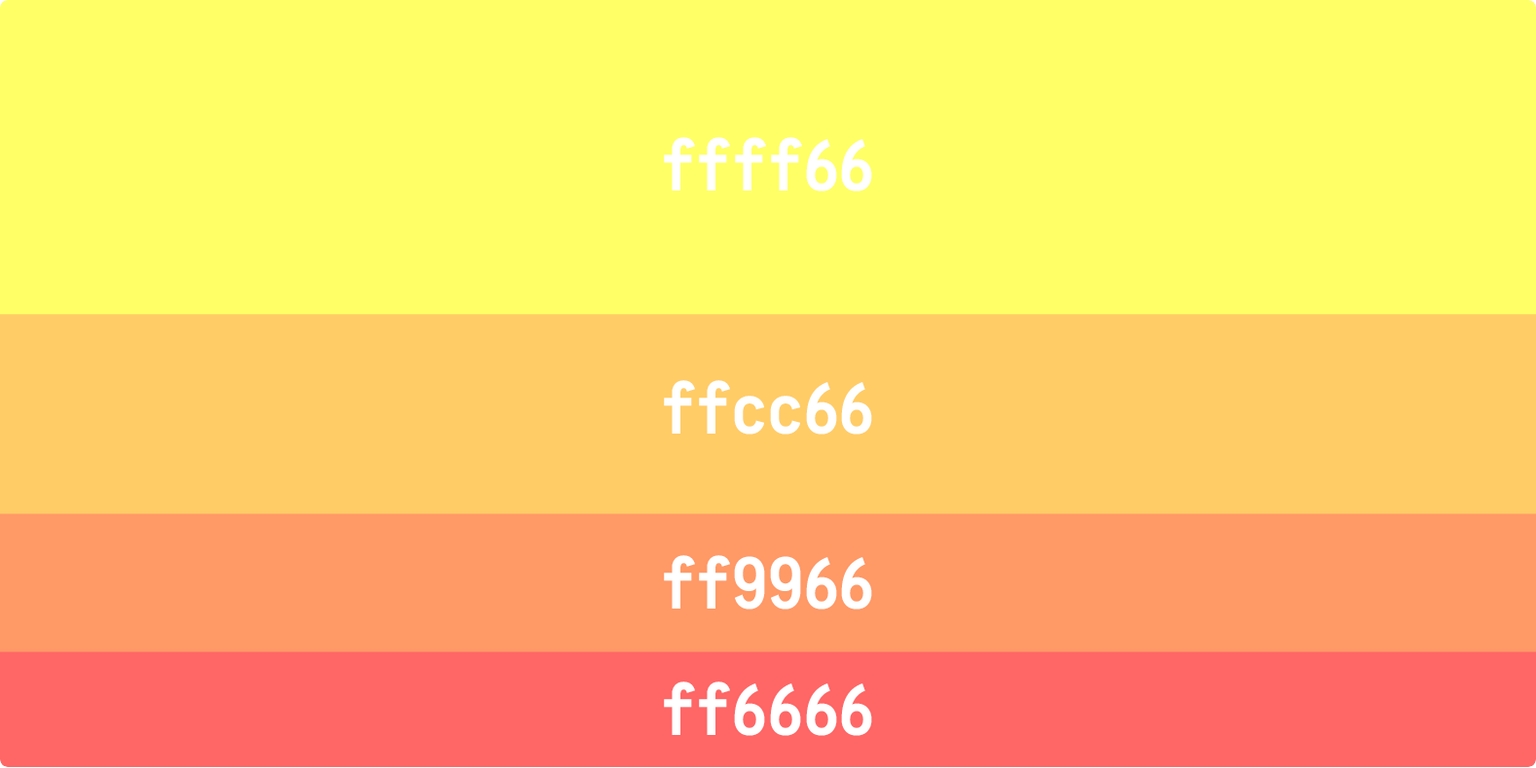
Remember VIBGYOR (Violet, Indigo, Blue, Green, Yellow, Orange, Red) from school days? You can generate a nice VIBGYOR palette using a permutation of just four codes **c, f, 6, 9** ... like so ...

![Violet, Indigo, Blue, Green](https://799490287-files.gitbook.io/~/files/v0/b/gitbook-x-prod.appspot.com/o/spaces%2FrBivE1FyCVwIqE5rQR3A%2Fuploads%2FFea9A5miQ01fxoNUuXG4%2Fviolet%20indigo.png?alt=media\&token=5a96f6a0-1652-4bf3-9407-d456860af639)

<figure><img src="https://799490287-files.gitbook.io/~/files/v0/b/gitbook-x-prod.appspot.com/o/spaces%2FrBivE1FyCVwIqE5rQR3A%2Fuploads%2FaSIkcyUwThYR2ZSAXKyr%2Fyellow%20orange.jpeg?alt=media&amp;token=c2495ed8-48b8-4b86-b35d-d4b7c61f2b28" alt=""><figcaption><p>Yellow, Orange, Another Orange, Red</p></figcaption></figure>

The colors above are the softer side of their darker variants. The darker colors (for example the darkest red is ff000) are harsh on the eyes and are best avoided.

Prefer soft pastel colors instead? Just remember **a,b,c,d,e,f**. Using a permutation of these six codes (abcdef, bafedc, etc.) you can generate many soft pastel colors ... like below ...

![Just A-B-C-D-E-F](https://799490287-files.gitbook.io/~/files/v0/b/gitbook-x-prod.appspot.com/o/spaces%2FrBivE1FyCVwIqE5rQR3A%2Fuploads%2FbJPMJCpvoyYjCJftjUF3%2Fabcdef.jpeg?alt=media\&token=16474170-b31e-436d-8742-06f3dc01d762)

### 2. Text

Text is usually dark (blacks). Here also i tend to avoid the darkest darks (full black is 000000). I like the colors below because they give me a nice dark blue tint. The codes are also easy to remember. **1a2a3a** is darker and you can go all the way to **7a8a9a** which is lighter.

![Text Colors](https://799490287-files.gitbook.io/~/files/v0/b/gitbook-x-prod.appspot.com/o/spaces%2FrBivE1FyCVwIqE5rQR3A%2Fuploads%2FFzNu1WHSZTSPjJVn24OM%2Ftext.jpeg?alt=media\&token=68ab6cb8-d93e-460e-8702-4dd8d54aac4f)

### 3. Backgrounds, Boxes, Lines

These are usually grays (or 'greys' if you insist). Mostly used for backgrounds, table header or table row colors, lines, and, occasionally for text. These hex codes are the easiest to remember.

![Grays](https://799490287-files.gitbook.io/~/files/v0/b/gitbook-x-prod.appspot.com/o/spaces%2FrBivE1FyCVwIqE5rQR3A%2Fuploads%2FE1eWaQliQZLWDIOHIN4B%2Fgreys.jpeg?alt=media\&token=ab4b8622-17b5-46ca-938c-763468513b92)

That's all there is. Once you get a hang of this it becomes easy to play around and arrive at colors that you like better than what are presented here. I recommend [<mark style="color:red;">https://colorhunt.co/</mark>](https://colorhunt.co/). You should check out [<mark style="color:red;">Canva's Color Wheel</mark>](https://www.canva.com/colors/color-wheel/) too.

{% hint style="success" %}

#### Discuss this article on HN: [<mark style="color:red;">https://news.ycombinator.com/item?id=19400870</mark>](https://news.ycombinator.com/item?id=19400870)

{% endhint %}


# Simple Startup Cashflow Projections (Spreadsheet)

{% hint style="info" %}

#### Originally published [<mark style="color:red;">here</mark>](https://docs.sendwithses.com/random-stuff/startup-cashflow-projections-spreadsheet) on our old blog.

{% endhint %}

As a Founder, estimating and projecting your cashflows can give you enormous decision making clarity. This '***Simple Startup Cashflow Projections***' spreadsheet can provider faster insights on the state of your finances than your accounting software. We made this spreadsheet many years ago for our internal use. We hope you will find this useful as much as we have.

Just make a copy of the below Google Sheet to start using it. The only caveat is, you should be ***'un-emotional'*** when plugging in your numbers.

#### [https://docs.google.com/spreadsheets/d/1ILiW2AHtqbYA4RWPlXJ3GKm-nDS3DVuxwhhASlPATkM/edit?usp=sharing ](<https://docs.google.com/spreadsheets/d/1ILiW2AHtqbYA4RWPlXJ3GKm-nDS3DVuxwhhASlPATkM/edit?usp=sharing >)

{% embed url="<https://docs.google.com/spreadsheets/d/1ILiW2AHtqbYA4RWPlXJ3GKm-nDS3DVuxwhhASlPATkM/edit?usp=sharing>" %}

{% hint style="danger" %}
**NOTE: This spreadsheet is NOT a substitute for regular accounting software.**
{% endhint %}

{% hint style="success" %}

#### Discuss this article on HN: <https://news.ycombinator.com/item?id=20507992>

{% endhint %}


# Enemy At The (Billing) Gates

An online payment of USD 150 generates USD 14 for the middlemen.

{% hint style="info" %}

#### Originally published [<mark style="color:red;">here</mark>](https://docs.sendwithses.com/random-stuff/enemy-at-the-billing-gates) on our old blog.

{% endhint %}

#### If you sell any product/service online, the journey of money from a paying customer to your bank account has a story to tell.

We launched [**Send With SES**](https://www.sendwithses.com) ~~a few months ago~~ in early 2018. Currently **Send With SES** accepts only USD. This means, if you are a customer outside USA, you are charged in your local currency but your bank/card company pays us in USD. **Send With SES** is based in Singapore. So [Stripe](https://stripe.com) (our payment gateway) which receives this USD amount on our behalf, converts it to SGD and transfers it to our bank account.

#### Well, that’s the theory. Let’s see a real life case ...

A customer (and friend) from India recently subscribed to our Medium Plan ($150).&#x20;

#### Expectations ...

Customer expects to pay USD 150 (INR 10,620) and Send With SES expects to receive USD 150 (SGD 204).

#### Reality ...

1. **Customers Bank adds its fees and charges Customer INR 11,049 (USD 156)**
2. Stripe receives: USD 150 (SGD 204)
3. Stripe currency conversion charges: 2% x 204 = SGD 4
4. Gross Stripe Amount: 204 - 4 = SGD 200
5. Stripe charges: 3.4% x 200 + 0.5 = SGD 7.3
6. **Net paid by Stripe to Send With SES: 200 - 7.3 = SGD 192.7 (142 USD)**

#### In effect, this is what has happened ...

* Customer expects to pay USD 150 but pays USD 156
* Business expects to receive USD 150 but receives USD 142
* **An online payment of USD 150 has generated USD 14 for the middlemen.**

There is nothing wrong in this. Banks and Payment Gateways like Stripe play a '*valuable*' role in the movement of money. This is the price we pay for the ease of doing business.&#x20;

{% hint style="success" %}
**Bank and Payment Gateway charges can be significant. You need to account for these in any** [**CashFlow Projections**](/simple-startup-cashflow-projections-spreadsheet) **you do. I would suggest you calculate these charges at&#x20;**~~**5%**~~**&#x20;6% of your revenue.**&#x20;
{% endhint %}

#### Just understand that when it comes to online payments, you always pay more ...&#x20;

<img src="https://799490287-files.gitbook.io/~/files/v0/b/gitbook-x-prod.appspot.com/o/spaces%2FrBivE1FyCVwIqE5rQR3A%2Fuploads%2F8cdRAKqrP00x7eAnDYnl%2Fic%20bank%20statement.jpeg?alt=media&amp;token=4311a676-04ec-4cec-9f13-6ddca942c876" alt="Customer bank statement" width="360">

#### ... or receive less than what you expect.&#x20;

![Stripe statement for Send With SES](https://799490287-files.gitbook.io/~/files/v0/b/gitbook-x-prod.appspot.com/o/spaces%2FrBivE1FyCVwIqE5rQR3A%2Fuploads%2Fe8Fg1WMKLsb0E7yKlY0l%2Fstripe%20statement.jpeg?alt=media\&token=1fd4a156-aad3-4ca4-9204-d2936608ac45)

#### There are few ways to reduce these charges ...

1. Show and accept prices in local currencies so your customers know exactly how much they are paying. Stripe and most other payment gateways allow you [to do this](https://stripe.com/docs/currencies#presentment-currencies).&#x20;
2. Get a bank account which accepts the same currency as your [settlement currency](https://stripe.com/docs/payouts#supported-accounts-and-settlement-currencies). This will help you avoid currency conversion charges.
3. Register your business in a [low-stripe-charge](https://stripe.com/ie/pricing) country.
4. If you have a large payments volume, you can negotiate with Stripe (or your payment gateway) to reduce them.&#x20;

Do you know of any other ways? Let us know .. hello<@>sendwithses<.>com.

{% hint style="info" %}

#### **Note:** All currency conversions done using [xe.com](https://www.xe.com) on 31-October-2019

{% endhint %}

{% hint style="success" %}

#### Discuss this article on HN: <https://news.ycombinator.com/item?id=21565784>

{% endhint %}


# Stripe Country Comparison

{% hint style="info" %}

#### Originally published [<mark style="color:red;">here</mark>](https://docs.sendwithses.com/random-stuff/stripe-country-comparison) on our old blog.

#### This version has been updated on 31-July-2024

{% endhint %}

[Stripe](https://stripe.com/) is directly available in [46 countries](https://stripe.com/global). The charges vary country by country. As a thumb rule, Stripe charges are \~ 6.5%.

This [Google Sheet](https://docs.google.com/spreadsheets/d/1wqs3LHNPZsKymxszsmSaUaiCXgPc-VjIVCvYAdj00xI/edit?usp=sharing) compares all 43 Stripe countries. Make a copy if you wish to edit it.

{% embed url="<https://docs.google.com/spreadsheets/d/1wqs3LHNPZsKymxszsmSaUaiCXgPc-VjIVCvYAdj00xI>" %}

Stripe charges depend on four main factors.&#x20;

1. **Business Location:** The country where your company (and bank account) is registered.
2. **Customer Card Type:** Local cards are charged less while international cards are charged about 1.5% more. &#x20;
3. **Presentment Currency:**  The currency in which you bill your customers.
4. **Payout Currency:** Your local currency. Stripe usually pays you only in your local currency. Stripe charges a 2% currency conversion fee if your Payout Currency is different from your Presentment Currency. :(

### Highest Stripe Charge Countries.

Assuming your presentment and payout currencies are the same, top-3 countries with highest Stripe charges are ...&#x20;

1. Mexico (7.10%)
2. Hong Kong (6.25%)
3. Malaysia (5.90%)

### Lowest Stripe Charge Countries

Again, assuming your presentment and payout currencies are the same, European countries have the lowest Stripe charges (2.15% and 3.65% for local and international cards respectively).

Within EU, Norway has the highest Stripe charges (4.90% and 5.40% for local and international cards respectively).

{% hint style="success" %}

#### Also Read: [Enemy At The (Billing) Gates](/enemy-at-the-billing-gates).&#x20;

{% endhint %}

#### NOTE: Please write to hello\[at]sendwithses.com if you find a mistake in any calculations.

{% hint style="success" %}

#### Discuss this article on HN: <https://news.ycombinator.com/item?id=22012281>

{% endhint %}


# Email Resources


# Marketing Emails with AWS SES

The easy way to use AWS SES for marketing emails.

{% hint style="success" %}
**The first order of business is to convince yourself to use "**[**SENDUNE**](https://sendune.com/) **+** [**AWS SES**](https://aws.amazon.com/ses/)**" for all your marketing emails. Here's our** [**rationale**](https://sendune.com/pages/why-switch-to-sendune) **why you should do it.**
{% endhint %}

If you are a Startup, chances are your entire tech stack is on AWS but you are not using AWS SES. Instead you use a third party email service like Mailchimp or SendGrid.

AWS SES has the same reliability and deliverability as any other email service. And it comes at a price point too good to ignore. So why does SES not have 'top-of-mind' recall when it comes to marketing email. There are a few reasons we know of.

* AWS SES is hard to get started with. You need to get out of the sandbox first.
* There's pages and pages of documentation to deal with.
* There's no contact management.
* You cannot design and manage email templates.
* Expensive add-ons (delivery dashboard/virtual deliverability manager).

Is there a way to overcomes these hurdles? YES. That's where [SENDUNE](https://sendune.com/) comes in.

SENDUNE abstracts away all the complexity of sending marketing emails with AWS. What you get is a highly reliable way to deliver all your marketing emails at a fraction of the cost.

Marketing emails are messages sent by businesses to promote their products or services directly to current and potential customers. These emails are a key part of digital marketing strategies and can serve various purposes, such as announcing new products, sharing special offers, or providing valuable content to engage the audience.

### Create Email Templates.

A template needs to be created in SENDUNE for every kind of marketing email you wish to send. You can create templates using the no-code designer or the html editor or the plain text version.

Click the '**Send**' button at the top to open the email composer (see video below). There are three template categories. You can create as many templates as you wish within each category.

* **SENDUNE Designer**: A visual editor that makes it very easy to design emails.
* **HTML Editor**: Use this if want to code your own emails. If you have purchased any HTML template, you can copy-paste that code in the HTML Editor.
* **Plain Text**: This is as simple as it gets. Use it compose plain text emails just like you do in Gmail or Outlook. Though they look simple, plain text emails perform very well.

{% embed url="<https://iframe.mediadelivery.net/play/274833/630d31b3-387a-45e0-b2f8-c017c66f577a>" %}

### Send Emails.

To send marketing emails, select one or more contacts, choose a template and click '**Send**'. Once the emails are sent you can view delivery statistics. See video below.

{% embed url="<https://iframe.mediadelivery.net/play/274833/9711107c-4ce2-4b99-bffd-33fb8dae002d>" %}

### SENDUNE handles everything.

SENDUNE automatically queues your emails and delivers them according to the sending rate available for your AWS SES account. SENDUNE also processes all delivery stats as part of the [InboxVISA](https://sendune.com/pages/inboxvisa) to protect your account.

That's all there is to it. Here are some takeaways.

* You can create any fancy template using the SENDUNE Designer or the HTML Editor.
* You can have as many 'replace-tags (merge tags)' as you want within each marketing email template.
* You can create as many marketing email templates as you wish.
* Once your templates are ready you can forget all about them. They will just work. SENDUNE + AWS SES is that reliable.
* You can give access to your SENDUNE account to your marketing or product teams so they can create the templates.&#x20;

There is no limit to the kinds of marketing emails you can create and send.

Remember all these marketing templates reside outside your application code. So you can come back and make any changes without any downtime to your application.  That's the ultimate beauty of using SENDUNE.

### **Convinced? Signup for the forever free account now.**

[Sign up for FREE](https://app.sendune.com/)


# Transactional Emails with AWS SES

The easy way to use AWS SES for transactional emails.

{% hint style="success" %}
**The first order of business is to convince yourself to use "**[**SENDUNE**](https://sendune.com) **+** [**AWS SES**](https://aws.amazon.com/ses/)**" for all your transactional emails. Here's our** [**rationale**](https://sendune.com/pages/why-switch-to-sendune) **why you should do it.**
{% endhint %}

If you are a Startup, chances are your entire tech stack is on AWS but you are not using AWS SES. Instead you use a third party email service like Mailchimp or SendGrid.

AWS SES has the same reliability and deliverability as any other email service. And it comes at a price point too good to ignore. So why does SES not have 'top-of-mind' recall when it comes to transactional email. There are a few reasons we know of.

* AWS SES is hard to get started with. You need to get out of the sandbox first.
* There's pages and pages of documentation to deal with.
* There's no contact management.
* You cannot design and manage email templates.
* Expensive add-ons (delivery dashboard/virtual deliverability manager).

Is there a way to overcomes these hurdles? YES. That's where [SENDUNE](https://sendune.com/) comes in.

SENDUNE abstracts away all the complexity of sending transactional emails with AWS. What you get is a highly reliable way to deliver all your transactional emails at a fraction of the cost.

Transactional emails are emails that your customers expect to receive from you. I mean they are refreshing their inbox waiting for your email to show up. The greatest examples of transactional emails are the ones you send for user 'Signups' and 'Password Resets'.

A template needs to be created in SENDUNE for every kind of transactional email you wish to send. You can create templates using the no-code designer or the html editor or the plain text version.

Let's illustrate how you can set up an email template. We'll use a live example - i.e. an actual transactional email that we use at SENDUNE for user sign ups. In our case we have created an email template using the plain text designer. Our user sign up email template looks like this.

<figure><img src="https://sendune.com/cdn/shop/files/sendune_transactional_email_template.png?v=1726125306&#x26;width=3200" alt=""><figcaption></figcaption></figure>

This template is triggered via an [API call](https://docs.sendune.com/email#api-email) whenever a new user wants to sign up. Notice the template contains a '[replace tag](https://docs.sendune.com/email#replace-tags-merge-tags)' in double curly brackets **{ {signup-link} }**.

<figure><img src="https://sendune.com/cdn/shop/files/sendune_transactional_email_template_30a8726b-6774-44eb-bd86-d4318c7126ff.png?v=1726127627&#x26;width=3200" alt=""><figcaption></figcaption></figure>

The API call is a simple [cURL request](https://docs.sendune.com/email#api-email). The **{ {signup-link} }** is replaced with an actual link the end user can click to complete the signup process. Below is the actual email sent. Users click on the link and complete the sign up process.

<figure><img src="https://sendune.com/cdn/shop/files/sendune_transactional_email.png?v=1726125305&#x26;width=3200" alt=""><figcaption></figcaption></figure>

That's all there is to it. Here are some takeaways.

* We have created a plain text template. You can create any fancy template using the SENDUNE Designer or the HTML Editor.
* You can have as many 'replace-tags (merge tags)' as you want within each template.
* You can create as many transactional templates as you wish.
* Once your templates are ready you can forget all about them. They will just work. We have clients who have created transactional email templates for signups and password resets many years ago and haven't touched them since. SENDUNE + AWS SES is that reliable.
* You can have your engineering teams or product managers create the templates while the tech team just does the API integration.&#x20;

There is no limit to the kinds of transactional emails you can create and send. Apart from Sign ups and Password Resets you can create transactional emails for sending invoices, order notifications, payment updates, e-commerce notifications, or just about anything.

Remember all these templates reside outside your application code. So you can come back and make any changes without any downtime to your application.  That's the ultimate beauty of using SENDUNE.

### **Convinced? Signup for the forever free SENDUNE account now.**

[Sign up for FREE](https://app.sendune.com/)


# DNSBL

A quick overview of how DNSBLs work and how AWS SES and SENDUNE.com protect you.

### A quick overview of how [DNSBLs](https://www.dnsbl.info/) work and how [AWS SES](https://aws.amazon.com/ses/) and [SENDUNE](https://sendune.com/) protect you.

Domain Name System-based Blackhole Lists (DNSBLs)—sometimes called real-time blackhole lists (RBLs), reject lists, block lists, or blacklists—are intended to inform email service providers (e.g Gmail, Yahoo, and Outlook) of IP addresses suspected of sending unsolicited email.

### Is your IP Blocked? <a href="#id-4500" id="id-4500"></a>

Let’s say an email service provider rejects your email. Is it because your email server’s IP address is blacklisted? How can you verify this?\
\
It’s easy to do. Open the raw content of any email. You will see something like below.

> **554 5.7.1 Service unavailable; Client host \[192.0.2.0] blocked by DNSBLName; See:** [**http://www.example.com/query/ip/192.0.2.0**](http://www.example.com/query/ip/192.0.2.0)

The string above is an error message from the mail server indicating that email delivery is blocked. Let’s break it down:\
\
**1. 554 5.7.1**:

* **554**: This is an SMTP error code indicating that the email was rejected by the receiving mail server. There is a permanent error, which means that the message will not be delivered.
* **5.7.1**: This enhanced status code provides more information. It usually indicates a flaw associated with the sender’s ability to send email, such as blocked addresses or spam filtering.

**2. Service unavailability**: The email service rejects the connection and refuses to process the message.

**3. Client host \[192.0.2.0] blocked with \<DNSBLName>**:

* The IP address **192.0.2.0** of the email sending server has been blocked because it was listed in a **DNSBL** (Domain Name System Blacklist).
* **DNSBLName** is a field for the actual DNS Blacklist provider name.

**4. See:** [**http://www.example.com/query/ip/192.0.2.0**:](http://www.example.com/query/ip/192.0.2.0:) This link is given to help the sender understand why the IP is blocked. They can query the IP address for more info or request IP removal from the blacklist.

To summarize, the message indicates that an email from the IP address **192.0.2.0** was blocked because the IP is listed on a DNS Blacklist (DNSBL). To resolve the issue, the sender needs to visit the URL (<http://www.example.com/query/ip/192.0.2.0>) and follow instructions for unblocking the IP address.

To summarize, the message shows that an email from the IP address 192.0.2.0 was blocked because the IP is listed on a DNS Blacklist. To resolve the problem, the sender is required to visit the given URL and follow certain instructions to  unblock the IP address.

### FAQ's about DNSBLs

### 1. How do DNSBLs impact email delivery? <a href="#bl-q1" id="bl-q1"></a>

Different DNSBLs have different impacts on the successful delivery of a message. Major email providers—including Gmail, Hotmail, AOL, and Yahoo—seem to recognize a very small number of highly regarded DNSBLs, such as those offered by Spamhaus. In our experience, other DNSBLs tend to have a low impact, although some mail systems emphasize certain DNSBLs over others.

Finally, many email providers have their own internal deny lists. Email providers guard these lists very closely, and rarely share them with the public. If an IP address is on one of these lists, it can have a major impact on your ability to send email to recipients who use that provider.

### 2. How do IP addresses end up on DNSBLs? <a href="#bl-q2" id="bl-q2"></a>

There are several ways that an IP address can end up on a DNSBL. IP addresses can be added to DNSBLs when they send email to a *spamtrap*. A spamtrap is an email address that doesn't belong to a human user. Spamtraps exist solely to collect spam and identify spammers. Some DNSBLs also allow individual users to submit IP addresses. A few DNSBLs even allow users to submit entire IP address ranges. Other DNSBLs are maintained through contributions by email administrators, and can include IP addresses that administrators believe are abusing their own systems.

### 3. How does Amazon SES prevent its IP addresses from appearing on DNSBLs? <a href="#bl-q3" id="bl-q3"></a>

AWS SES systems look for signs of abuse. If your email sending patterns or other characteristics could lead to an IP address being added to a DNSBL, you will receive a notification from AWS SES. If the situation is severe, or if you do not fix the issue even after the notification, your email sending will be paused until you resolve the issue. Enforcing these sending policies helps reduce the chances that IP addresses belonging to AWS SES end up on DNSBLs.

### 4. Can Amazon SES have its IP addresses removed from a DNSBL? <a href="#bl-q4" id="bl-q4"></a>

AWS SES actively monitors DNSBLs that could impact delivery across the entire Amazon SES service, or that could impact the ability to send email to recipients who use major email providers, such as Gmail, Yahoo, AOL, and Hotmail. The DNSBLs offered by Spamhaus fall into this category. When one of our IP addresses appears on a list that meets either of these criteria, we take immediate action to have that address removed from the DNSBL as quickly as possible.

We don't monitor DNSBLs that are unlikely to impact delivery across the entire Amazon SES service, or that don't have a measurable impact on delivery to major email providers. The DNSBLs offered by SORBS and UCEPROTECT fall into this category. Because of the specific listing and delisting practices of the vendors who operate these lists, we are unable to have our IP addresses removed from these lists.

### 5. Email that I send to Gmail, Yahoo, Hotmail, or another major provider is being sent to the spam folder. Is this happening because my sending IP address is on a DNSBL? <a href="#bl-q6" id="bl-q6"></a>

Probably not. If an IP address is listed by a DNSBL with significant impact, such as one of the DNSBLs from Spamhaus, major email providers will reject email from that IP address completely, rather than sending it to the spam folder.

When major email providers accept an email (rather than rejecting it), they usually consider *user engagement* when considering whether to place the message in the inbox or in the spam folder. *User engagement* refers to the ways in which users interacted with the messages you sent them previously.

To increase the chances that your messages reach your customers' inboxes, you should implement all of the following best practices:

* Never rent or purchase lists of email addresses. Renting or purchasing lists is a violation of the [AWS Acceptable Use Policy](https://aws.amazon.com/aup) (AUP) and isn't allowed on Amazon SES under any circumstances.
* Only send email to customers who explicitly asked to receive email from you. In many countries and jurisdictions around the world, it's illegal to send email to recipients who didn't explicitly agree to receive email from you.
* Stop sending email to customers who haven't opened or clicked links in messages that you've sent in the past 30–90 days. This step can help to keep your engagement rates high, which increases the chances that the messages you send in the future arrive in recipients' inboxes.
* Use consistent design elements and writing styles in each message that you send to ensure that customers can easily identify messages from you.
* Use email authentication mechanisms, such as [SPF](https://docs.aws.amazon.com/ses/latest/dg/send-email-authentication-spf.html) and [DKIM](https://docs.aws.amazon.com/ses/latest/dg/send-email-authentication-dkim.html).
* When customers use a web form to subscribe to your content, send them an email to confirm that they want to receive email from you. Don't send them any additional email until they confirm that they want to receive email from you. This process is known as *confirmed opt-in* or *double opt-in*.
* Make it easy for your customers to unsubscribe, and honor unsubscribe requests immediately.
* If you send email that contains links, check those links against the Spamhaus Domain Block List (DBL). To test your links, use the [Domain Lookup Tool](https://www.spamhaus.org/lookup/) on the Spamhaus website.

By implementing these practices, you can improve your sender reputation, which increases the likelihood that the email you send reaches recipients' inboxes. Implementing these practices also helps keep the bounce and complaint rates low for your account, and reduces the risk of sending email to spamtraps.

### InboxVISA

SENDUNE's [InboxVISA](https://sendune.com/pages/inboxvisa) program is a collection of email sending best practices and real-time heuristics adopted by SENDUNE to protect all users and guide emails safely into user inboxes. While these practices create trust with email service providers, the final decider in avoiding DNSBLs and better inbox placement is the content of your email. Ultimately, the only one who can guarantee safe inbox placement is YOU.<br>


# Email deliverability and inbox placement

Breaking some myths.

Every **Email Service Provider (ESP)** claims to have the best deliverability. These statements are misleading. Let’s talk about this a bit.

Email is a decentralised system. Every ESP is like a separate country. Just like every country gets to decide who they let in, every ESP gets to decide which email to receive and what to do with it (like send to inbox or send to junk). It means that the Sending ESP has zero control over the Receiving ESP. So any statements guaranteeing email deliverability are bunk.

A well governed ESP, just like a well governed country, adheres to some rules and thereby builds a reputation. It is this reputation that allows the frictionless exchange of emails (i.e. deliverability).

So how do things work?

Email deliverability and inbox placement are a function of two things.

1. **Adhering to industry standards (DMARC, DKIM, SPF, etc):** All reputed ESP’s, including [SENDUNE](https://sendune.com/), give you the tools to adhere to industry standards. In fact SENDUNE insisted on these standards from the very start (early 2018), [much before](https://x.com/SendWithSES/status/1752737377943224479) they became mandatory. Adhering to these standards is like getting a ‘visa-on-arrival’ to another ESP. So deliverability comes down to the content of your email.
2. **The content of your email:** Email is a ‘Receivers’ prerogative, not the ‘Senders’. Even if you adhere to all the standards, sometimes your emails end up in spam folders. Gmail for example has a habit of sending emails from newer domains right into spam folders. Once you start marking them as 'not spam' they start getting delivered to your inbox. Yahoo, Outlook, Zoho, everyone has their quirks. This is why we recommend all new accounts to [warm up their email accounts](/email-resources/warming-up-your-email-account). It always comes down to the content of your email. The content must be both relevant, well formatted and well designed.

Remember, if you are sending unsolicited emails, the pedigree of your ESP cannot help you in any way. In fact every ESP including SENDUNE will kick spammers out without a moments hesitation.

{% hint style="success" %}
**TAKEAWAY:** Adhering to industry standards is a one time effort. Making content relevant to your subscribers is an ongoing effort. Focus on this and your emails will always hit the inbox.
{% endhint %}

Happy emailing.

***

[**SENDUNE**](https://sendune.com/) **is a one-stop email platform for AWS Developers and Startups using AWS. Just connect your AWS Account to handle all your transactional and marketing Emails, SMS, OTPs for** [**free**](https://sendune.com/pages/pricing)**.**


# Getting production access to AWS SES

Move out of AWS SES Sandbox and increase sending limits.

As of early 2024, AWS has changed the process to get production access to the Simple Email Service (SES). You are now required to have a domain with DNS records for SPF, DMARC, and DKIM in place before you can raise a ticket asking AWS to move you out of the SES Sandbox. This is a progressive step in controlling spam.

These steps are for everyone who wants to send emails using AWS SES and not just [**SENDUNE**](https://sendune.com) users. SENDUNE users must first complete the setups in your [settings dashboard](https://app.sendune.com/settings/aws-setup) and directly move to Step 9 below.&#x20;

Don't let the steps intimidate you. They look complicated but are quite easy.

1. Login to your AWS account. Search for 'SES' and go to the Simple Email Service dashboard.

<figure><img src="https://799490287-files.gitbook.io/~/files/v0/b/gitbook-x-prod.appspot.com/o/spaces%2FrBivE1FyCVwIqE5rQR3A%2Fuploads%2FAh9afQX93qCLKZ5mkszo%2F1%20Console-Home-Console-Home-ap-southeast-1.png?alt=media&amp;token=45d2ca37-77e0-43fd-b635-3e880947abcc" alt="" width="375"><figcaption><p>Click to zoom.</p></figcaption></figure>

2. Click the the dropdown at the top-right. Select the AWS region from which you want to send emails.&#x20;

<figure><img src="https://799490287-files.gitbook.io/~/files/v0/b/gitbook-x-prod.appspot.com/o/spaces%2FrBivE1FyCVwIqE5rQR3A%2Fuploads%2FoWWEJG6YUBBMxciutM9t%2F2%20Account-dashboard-Amazon-Simple-Email-Service-eu-west-1.png?alt=media&amp;token=7974c965-61e4-4a68-a264-fd55842b3954" alt="" width="375"><figcaption></figcaption></figure>

3. Select '**Account dashboard**' option from the left panel. Then click the '**Get set up page**' button.&#x20;

<figure><img src="https://799490287-files.gitbook.io/~/files/v0/b/gitbook-x-prod.appspot.com/o/spaces%2FrBivE1FyCVwIqE5rQR3A%2Fuploads%2FJs676lsUotcb6NJ53VUx%2F3%20Account-dashboard-Amazon-Simple-Email-Service-eu-west-1.png?alt=media&amp;token=f01f4611-ece9-458e-b02a-6caf26b38c1e" alt="" width="375"><figcaption></figcaption></figure>

4. Click '**Create identity**'. Identity here refers to an active domain that represents the business on behalf of which the emails will be sent.

<figure><img src="https://799490287-files.gitbook.io/~/files/v0/b/gitbook-x-prod.appspot.com/o/spaces%2FrBivE1FyCVwIqE5rQR3A%2Fuploads%2FogGOt56EMvmVgRexYF6G%2F4%20Amazon-Simple-Email-Service-eu-west-1.png?alt=media&amp;token=86faf651-a8a7-4cb1-acaf-120e06bed4d4" alt="" width="375"><figcaption></figcaption></figure>

5. Select the '**Domain**' radio button. Then enter your domain or sub-domain name. Then choose options as shown in the image below. It is recommended you use a sub-domain to send your emails because your main domain might be used for your business email. It is VERY IMPORTANT that the domain you enter here have an active website that showcases the nature of your business.

<figure><img src="https://799490287-files.gitbook.io/~/files/v0/b/gitbook-x-prod.appspot.com/o/spaces%2FrBivE1FyCVwIqE5rQR3A%2Fuploads%2FIeYir5PNKVzqVRC48sd4%2F5%20Create-identity-Amazon-Simple-Email-Service-eu-west-1.png?alt=media&amp;token=e21976b8-0232-4853-9311-e4aaccac8919" alt="" width="375"><figcaption></figcaption></figure>

6. You will be presented with 4 DNS Records (3 CNAME + 1 TXT). Enter these DNS records in your domain Registrars dashboard. These DNS records must not be deleted as long as you want to send emails.

<figure><img src="https://799490287-files.gitbook.io/~/files/v0/b/gitbook-x-prod.appspot.com/o/spaces%2FrBivE1FyCVwIqE5rQR3A%2Fuploads%2FZBzBEI5XZ6li4UGafjyX%2F6%20Details-page-Amazon-Simple-Email-Service-eu-west-1.png?alt=media&amp;token=0096a14d-476e-45c7-a9b9-67fe80f5cbc5" alt="" width="375"><figcaption></figcaption></figure>

7. AWS automatically checks for these DNS records at regular intervals. Once these records are validated, you will receive a confirmation email. It usually takes a few minutes but occasionally can take up to an hour to validate these records.

<figure><img src="https://799490287-files.gitbook.io/~/files/v0/b/gitbook-x-prod.appspot.com/o/spaces%2FrBivE1FyCVwIqE5rQR3A%2Fuploads%2Fui7bqtgzbKRz7npdoXUx%2F8%20DKIM-setup-SUCCESS-for-mails-vox-me-in-Europe-Ireland-region-yeleti-gmail-com-Gmail.png?alt=media&amp;token=e99993c6-53f8-439f-b576-fb779108a530" alt="" width="375"><figcaption></figcaption></figure>

8. In case you do not receive the above mail you can go to '**Identities**' section in SES dashboard to check for the verification status of your domain. SES dashboard will display a '<mark style="color:green;">Verified</mark>' status.&#x20;

<figure><img src="https://799490287-files.gitbook.io/~/files/v0/b/gitbook-x-prod.appspot.com/o/spaces%2FrBivE1FyCVwIqE5rQR3A%2Fuploads%2FBpLg78Zyfk5rNMyKGklh%2F9%20Details-page-Amazon-Simple-Email-Service-eu-west-1.png?alt=media&amp;token=ba1d6cd7-ce02-42f8-9816-5675a423cb93" alt="" width="375"><figcaption></figcaption></figure>

9. Click '**Get set up**' from left panel and then click '**Request production access**'.

<figure><img src="https://799490287-files.gitbook.io/~/files/v0/b/gitbook-x-prod.appspot.com/o/spaces%2FrBivE1FyCVwIqE5rQR3A%2Fuploads%2FC0hGmp9RNMSBezc3NhMU%2F10%20Amazon-Simple-Email-Service-eu-west-1.png?alt=media&amp;token=e5632a4a-2f7e-4b38-9967-63b6c7df771b" alt="" width="375"><figcaption></figcaption></figure>

10. Choose the type of emails you want to send, 'Marketing' or 'Transactional'. Enter the same domain that you have entered earlier. Accept terms and submit request. It is VERY IMPORTANT that the domain you enter here have an active website that showcases the nature of your business. AWS might reject your request if you do not have a website or just have a generic landing page.&#x20;

<figure><img src="https://799490287-files.gitbook.io/~/files/v0/b/gitbook-x-prod.appspot.com/o/spaces%2FrBivE1FyCVwIqE5rQR3A%2Fuploads%2FNpJ5S6zj0UqawPfyTuCK%2F11%20Request-production-access-Amazon-Simple-Email-Service-eu-west-1.png?alt=media&amp;token=782fd591-2e78-418c-bbb3-8f9d8fbff926" alt="" width="375"><figcaption></figcaption></figure>

11. That's it. You can sit back and relax. If everything is in order AWS will move your SES account into production and you will be able to send emails. It might take upto a day before AWS grants your request. Occasionally AWS might send you an email asking for more details. Reply with as much detail as possible. You must be able to convince AWS that you are a genuine email sender.  &#x20;

<figure><img src="https://799490287-files.gitbook.io/~/files/v0/b/gitbook-x-prod.appspot.com/o/spaces%2FrBivE1FyCVwIqE5rQR3A%2Fuploads%2FqaAa5FW8RcpVM7eEGk7m%2F12%20Get-set-up-Amazon-Simple-Email-Service-eu-west-1.png?alt=media&amp;token=cb4ed21f-1f1d-4a8c-bebc-002e4865ba27" alt="" width="375"><figcaption></figcaption></figure>

12. You will receive an email once AWS moves your SES account out of the sandbox. You can also click '**Account dashboard**' from the left panel and see your sending limits. For new accounts AWS grants a sending limit of 50,000 emails er day with a sending rate of 14 emails per second.

<figure><img src="https://799490287-files.gitbook.io/~/files/v0/b/gitbook-x-prod.appspot.com/o/spaces%2FrBivE1FyCVwIqE5rQR3A%2Fuploads%2FSmcmCAAcwycNRbHGZ0rd%2F13%20Account-dashboard-Amazon-Simple-Email-Service-eu-west-1.png?alt=media&amp;token=1fea0618-ff64-4cd3-b462-9846fd7ee377" alt="" width="375"><figcaption></figcaption></figure>

13. If you need more you can always raise a request to increase your limits.

<figure><img src="https://799490287-files.gitbook.io/~/files/v0/b/gitbook-x-prod.appspot.com/o/spaces%2FrBivE1FyCVwIqE5rQR3A%2Fuploads%2F86dj0fqqrchfoGibJLjL%2F14%20Quotas-list-Amazon-Simple-Email-Service-Amazon-SES-AWS-Service-Quotas.png?alt=media&amp;token=267b79f6-5ace-487e-978d-a071ee603b5b" alt="" width="375"><figcaption></figcaption></figure>

14. You can request a raise for your '**Sending quota'.**

<figure><img src="https://799490287-files.gitbook.io/~/files/v0/b/gitbook-x-prod.appspot.com/o/spaces%2FrBivE1FyCVwIqE5rQR3A%2Fuploads%2Fd9byVcWO0iaInNYOOBdi%2F15%20Quotas-list-Amazon-Simple-Email-Service-Amazon-SES-AWS-Service-Quotas.png?alt=media&amp;token=814f3179-6bed-4f66-aaaa-26477ef4d687" alt="" width="375"><figcaption></figcaption></figure>

15. You can also request a raise for your '**Sending rate'**.&#x20;

<figure><img src="https://799490287-files.gitbook.io/~/files/v0/b/gitbook-x-prod.appspot.com/o/spaces%2FrBivE1FyCVwIqE5rQR3A%2Fuploads%2FWcLdJUaX4IG4zrYBRvyy%2F16%20Quotas-list-Amazon-Simple-Email-Service-Amazon-SES-AWS-Service-Quotas.png?alt=media&amp;token=d4a7e4cc-b4dd-474a-9fae-0f764f528394" alt="" width="375"><figcaption></figcaption></figure>

16. And finally, keep an eye on your sending reputation. You can find this by clicking '**Reputation metrics**' in the SES dashboard. Make sure your reputation is always '<mark style="color:green;">Healthy</mark>'. AWS will block your account if you send unsolicited emails. These blocks are usually permanent. The block is not only for your AWS account but also for your domain.&#x20;

<figure><img src="https://799490287-files.gitbook.io/~/files/v0/b/gitbook-x-prod.appspot.com/o/spaces%2FrBivE1FyCVwIqE5rQR3A%2Fuploads%2FIjKtIn1CKGjgcUESRkHx%2F17%20Reputation-metrics-Amazon-Simple-Email-Service-eu-west-1.png?alt=media&amp;token=0b98c16d-ccf7-4462-8b6e-335bdb57dd8c" alt="" width="375"><figcaption></figcaption></figure>

Happy emailing.


# 10 tips for better email design and delivery

Over years of delivering millions of emails, we've come across some email patterns that work and many that don't. Some are design related while some are organisation related. Let's break some bubbles here - in no particular order.

1. Always send from a domain that has SPF, DMARC, DKIM records in place.
2. Remember, you are designing an email, not a website. If you want fine-grain controls like 'line heights', you are at the wrong place.
3. The more you nitpick on the design, the more likely it will break in email clients. (i.e. more moving parts == more breakages).
4. Transactional emails are best delivered in plain text.
5. For best results, HTML emails (transactional and marketing) must (mostly) fit ['above the fold'](https://en.wikipedia.org/wiki/Above_the_fold).
6. Rethink your design if it is more than one scroll depth.
7. The combined time spent by all the recipients who opened your marketing email will be lesser than the time you spent designing it. (This statement is an exaggeration, but you get the drift.)
8. Emails are being designed to impress bosses, not the end readers.
9. Avoiding spam folders is largely a function of the content of your email. Technology or the pedigree of your email sending service cannot help you if your content is unsolicited.
10. The top three email service providers control \~80% of the market. They can break you.

{% hint style="success" %}

#### SENDUNE's [InboxVISA](https://docs.sendune.com/inboxvisa) makes SPF, DMARC, DKIM record management easy for you and helps protect your domain from spammers, phishers, and other unauthorized parties. Most importantly they create trust and prevent your emails from landing in spam folders. &#x20;

{% endhint %}


# Open source HTML email editors

A master list of truly open source HTML email editors.

A casual web search for 'open source html email editors' gives you a ton of results. Most of these are not truly open source or are stripped down versions. So we've compiled a list of truly open source html email builders.&#x20;

We have listed only the ones that fit most conditions below. One star is assigned for meeting each condition.

1. Must be fully open source. The rule is you should be able to get the source code and integrate it in to your own application.
2. There must be a fully working demo.&#x20;
3. Must have proper documentation for integration.
4. Able to send a test email.
5. \>= 1000 Github stars.&#x20;

<table><thead><tr><th width="172">Name</th><th width="188">Demo Link</th><th width="174">Source Code</th><th>Rating</th></tr></thead><tbody><tr><td>Sendune Designer</td><td><a href="https://designer.sendune.com/">https://designer.sendune.com/</a></td><td><a href="https://github.com/SendWithSES/Drag-and-Drop-Email-Designer">https://github.com/SendWithSES/Drag-and-Drop-Email-Designer</a></td><td>★★★★★</td></tr><tr><td>Mosaico</td><td><a href="https://mosaico.io/">https://mosaico.io/</a></td><td><a href="https://github.com/voidlabs/mosaico">https://github.com/voidlabs/mosaico</a></td><td>★★★★★</td></tr><tr><td>GrapeJS</td><td><a href="https://grapesjs.com/">https://grapesjs.com/</a></td><td><a href="https://github.com/GrapesJS/grapesjs">https://github.com/GrapesJS/grapesjs</a></td><td>★★★★</td></tr><tr><td>Easy Email Editor</td><td><a href="https://email.maocanhua.cn/">https://email.maocanhua.cn/</a></td><td><a href="https://github.com/zalify/easy-email-editor">https://github.com/zalify/easy-email-editor</a></td><td>★★★</td></tr><tr><td>Paperbits</td><td><a href="https://paperbits.io/">https://paperbits.io/</a></td><td><a href="https://github.com/paperbits/paperbits-emails">https://github.com/paperbits/paperbits-emails</a></td><td>★★★</td></tr><tr><td>EmailBuilder.js</td><td><a href="https://emailbuilderjs.com/">https://emailbuilderjs.com/</a></td><td><a href="https://github.com/usewaypoint/email-builder-js">https://github.com/usewaypoint/email-builder-js</a></td><td>★★★</td></tr><tr><td>Maily</td><td><a href="https://maily.to/">https://maily.to/</a></td><td><a href="https://github.com/arikchakma/maily.to">https://github.com/arikchakma/maily.to</a></td><td>★★★</td></tr></tbody></table>

That's all we could find. As we mentioned we've listed only those that are truly open source and meet some basic conditions. Let us know if we missed any and we'll include them here.

**Last updated: 14-Aug-2024**


# Warming up your email account

The easy and free way to warm up your email account.

### While this article is written for warming up your [AWS SES](https://aws.amazon.com/ses/) email account associated with [SENDUNE](https://sendune.com/), you can follow the same steps to warm up any email account. <a href="#e2fa" id="e2fa"></a>

## What exactly is “warming up an email account”? <a href="#id-7036" id="id-7036"></a>

Email warm-up is the process of slowly increasing the number of emails sent from a new or inactive email account to build a reputation and avoid being marked as spam. When an email account is newly created or has not been used for a while, sending a large volume of emails right away can raise red flags with email service providers (like Gmail or Yahoo or Outlook). This will have your emails land in  spam folders and your account (or IP address) will get blacklisted.

To warm up an email account, small batches of emails are sent and then slowly ramped up over time. These initial emails are sent to known recipients who are likely to engage (open, reply, etc.), which helps signal to email providers that the account is trustworthy.

The goal is to establish a positive sending reputation with email providers so that future campaigns reach inboxes and spam folders.

New email accounts that immediately start blasting off a huge volume of emails will trigger spam filters at email service providers. Once your domain or IP address is flagged as a spammer, it is almost impossible to shake off that reputation.

## Email warm up — The DIY (do it yourself) way. <a href="#de38" id="de38"></a>

There are a lot of services that promise to warm up your email account for you in return for a payment. I have not tested any of these services. What i can only tell you is warming up your email is easy and you can do it yourself without spending $$$$. All that is needed is a little patience from you.

Here are some steps we HIGHLY RECOMMEND you follow in order to warm up your email account. Whether using a paid service or doing it yourself, the email warm up process will take a few weeks. Avoid anybody promising quick results.

## Week 1–2 <a href="#ce1a" id="ce1a"></a>

1. Send a Few Emails Initially: Start by sending a small number of emails (10–15 per day) to friends, colleagues, or yourself. Make sure you send them to as many email services as possible — Gmail, Yahoo, Outlook, iCloud, Zoho, Protonmail, Yandex, etc.
2. Personalize Your Emails: Make sure your emails are personalized and relevant to the recipients. Do not use ALL CAPS subject lines, excessive punctuation, or clickbait headlines.
3. Include Unsubscribe Link: It’s always advisable to include an unsubscribe link in your email. It keeps the recipients happy and is an important signal to the email service providers that you are are a serious adherent to best practices.
4. Engage With Your Audience: An email is designed to be a two-way conversation. Encourage your recipients to respond and engage them with your replies.
5. Monitor These Initial Emails: Many email service providers randomly send the first few emails into spam folders. Look out for such emails and mark them as ‘Not Spam’.

## Week 3–4 <a href="#b8c5" id="b8c5"></a>

Here you will continue doing everything you did during the first two weeks plus the following.

1. Increase Volume Gradually: Slowly increase the number of emails you send each day by 10–20% every few days. Avoid sudden spikes in volume.
2. Monitor Engagement: Track open rates, click rates, and responses. Adjust your sending volume and email content based on the engagement you receive.

## Week 5 Onwards <a href="#id-4ae7" id="id-4ae7"></a>

By now your email account would have been sufficiently warmed up. You must still follow these best practices to maintain your reputation.

1. Send Relevant Content: Always ensure your emails are relevant and valuable to your recipients.
2. Stay Consistent: Maintain a consistent sending schedule to build trust with email service providers.

## How SENDUNE helps. <a href="#id-5d34" id="id-5d34"></a>

[SENDUNE](https://sendune.com/) is a free and open source [Email Platform](https://sendune.com/pages/why-switch-to-sendune) built for anyone using [AWS SES](https://aws.amazon.com/ses/).

Every account on SENDUNE is automatically enrolled in their [InboxVISA](https://sendune.com/pages/inboxvisa) program — a collection of email sending best practices (including email warm ups) and real-time heuristics adopted by SENDUNE to protect you and guide emails safely into user inboxes. While these practices create trust with email service providers, the final decider in inbox placement is the content of your email. Ultimately, the only one who can guarantee safe inbox placement is YOU.


# Open source HTML email editor and designer

The core of [SENDUNE](https://sendune.com/) is the email template designer. It lets you create and save templates that you can use to send emails manually or via the API.

* The source code is available on [Github](https://github.com/SendWithSES) under the MIT license.
* A demo is available here: <https://designer.sendune.com/>

HTML for email is probably the hardest code to write. Even a teeny-tiny deviation from the rules will break the email in untold combination of os/desktop/mobile clients. It's mid 2024. Almost 50 years since email was invented and 35 years since HTML was born. A 'basic-open-source-HTML-email-designer' must be a solved problem, right? We thought so too. Sadly, that's not the case. There are a few decent open source email designers but they carry dependencies that make them cumbersome to embed within your app. That's why we decided to open source our HTML Email Designer. The SENDUNE email designer focuses on simplicity and ease of use. It is light-weight. It does pure HTML - no intermediate code wranglers like mjml. There is no lock-in of any kind. Save HTML output as a template and use with ANY email service provider. Feel free to fork the repository, make improvements, and submit pull requests.

#### ⁉️ Why Choose SENDUNE Email Designer? <a href="#why-choose-sendune-email-designer" id="why-choose-sendune-email-designer"></a>

* **Truly Open Source:** Use it for personal use or commercial use or whatever.
* **Truly Free:** Because the ones that say 'free', are not.
* **Truly Works:** Because the ones that are free don't seem to work.
* **Truly HTML:** No intermediate code wranglers like mjml.
* **Truly Fast and Light Weight:** Because you have better things to do with your time.
* **Truly No-Code:** Design like a pro without coding headaches. Our minimal interface gets out of your way.
* **Truly Democratic:** Save HTML output as a template and use with ANY email service provider.

#### 3️⃣ Three Ways To Create Templates <a href="#id-3-three-ways-to-create-templates" id="id-3-three-ways-to-create-templates"></a>

Comes with three template types that let you design any kind of transactional or marketing emails. Altogther, you can create and save unlimited templates.

* **Drag and Drop Designer** - Start designing beautiful emails immediately.
* **HTML Code Editor** - Reuse HTML templates that you already have or code them from scratch.
* **Plain Text Emails** - 'Minimalists'. This is for you.

#### 🚀 Built On Solid Fundamentals. <a href="#built-on-solid-fundamentals" id="built-on-solid-fundamentals"></a>

Follows a few fundamental rules to design emails that work in nearly all email clients (web and mobile). It is built upon some great work done by these people.

* Ted Goas - <https://www.cerberusemail.com>
* Nicole Merlin - <https://www.emailwizardry.com.au>
* Mark Robbins - <https://www.goodemailcode.com>

#### 🎪 Live Demo. <a href="#live-demo" id="live-demo"></a>

Play around with the live demo at [https://designer.sendune.com](https://designer.sendune.com/). You can design a template and send yourself a test email.

#### 👩‍💻 Installation <a href="#installation" id="installation"></a>

Install via NPM:

Copy

```
npm install @send-with-ses/ng-email-designer
```

Or via YARN:

Copy

```
yarn add @send-with-ses/ng-email-designer
```

#### 🖼️ Image Handling <a href="#image-handling" id="image-handling"></a>

You can use a cloud storage of your choice (ex: AWS S3, Cloudflare R2, GCP Cloud Storage etc) for storing your images. Please implement your image upload functionality and provide it to the library as below (imageUploadTriggered/imageSelectionTriggered).

Copy

```
<lib-email-designer #emailEditor class="px-0"
    [type]="selectedTemplateType" [template]="selectedTemplate"
    (imageSelectionTriggered)="onImageSelectionTrigger($event)"
    (imageUploadTriggered)="onImageUploadTrigger($event)"
    (emailContentChanged)="onEmailContentChange($event)"
>
</lib-email-designer>
```

[Click here](https://www.npmjs.com/package/@send-with-ses/ng-email-designer) for more documentation

#### 🎨 UI Theming and Styles <a href="#ui-theming-and-styles" id="ui-theming-and-styles"></a>

You can make a few changes to make the Email Designer match your website colors. Import the following styles into your global styles file (e.g., styles.scss):

Copy

```
@import '../node_modules/email-designer/src/lib/theme.scss';
@import '../node_modules/email-designer/src/lib/email-editor.css';
```

To make the Email Designer match your website's UI, include the following in your main.scss or styles.scss file and change the colors as you like.

Copy

```
:root {
--sws-icon-color: #ccc;
--sws-icon-hover-color: #555;
--sws-header-background: #eee;
--sws-header-text-color: #555;
--sws-border-color: #ccc;
}
```

#### 🤝 Contribute. <a href="#contribute" id="contribute"></a>

Feel free to fork the repository, make improvements, and submit pull requests.

#### 🐛 Issues or Ideas. <a href="#issues-or-ideas" id="issues-or-ideas"></a>

Spotted a bug or got an idea? Just open an issue or write to designer at sendwithses dot org.

\- - - - - - - - - - - - - -

SENDUNE open source HTML editor and template builder.

Available on Github. MIT license.

<https://github.com/SendWithSES>

[![](https://docs.sendune.com/~gitbook/image?url=https%3A%2F%2Fhackerbadge.now.sh%2Fapi%3Fid%3D41007403\&width=300\&dpr=4\&quality=100\&sign=9d01a94b\&sv=1)](https://news.ycombinator.com/item?id=41007403)